
English
Appearance
The integration automatically exposes a variety of entities dedicated to map visualization and management. These include dynamic camera entities for rendering live and saved maps, select entities for managing multi-floor layouts and map rotation, button entities for triggering new mapping tasks, and sensor entities that provide historical data and current room tracking.

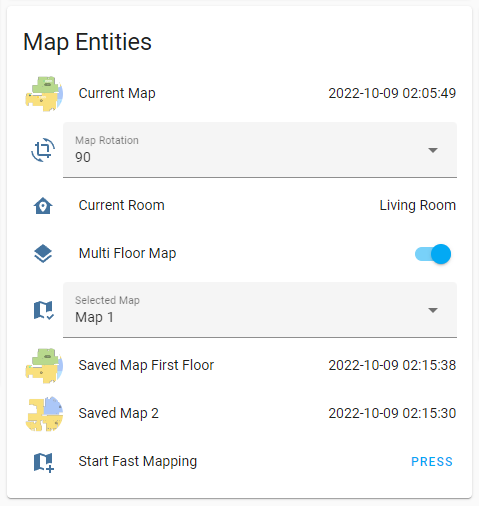
The availability of these entities depends on the device's map support capabilities and the active connection method.
Up to three saved maps with auto generated camera and select entities for multiple floor map management.
NOTE
Saved maps uses [original map id][version] as their map_id format (e.g. 46). Because of that map ids are constantly changing and cannot be used on entity ids. Instead, map camera entities uses indexing system. Map indexes created from map id ordered saved map list and used for naming maps without custom names. Therefore when map_2 removed from the list, map_3 will be deleted instead and map_3 will become map_2 (exactly how handled on the official App). If Multi-floor map is disabled when multiple saved maps exists map_1 always become the selected map instead of other maps being deleted.

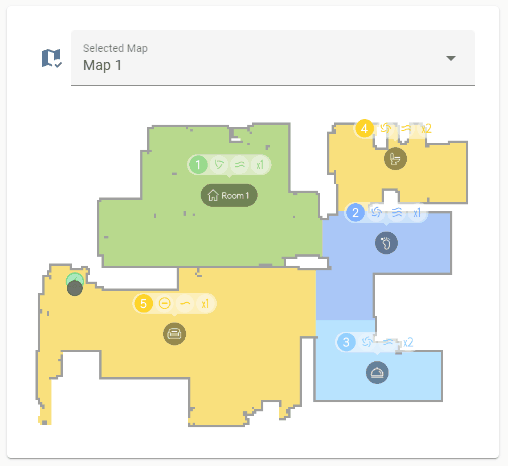
| Name | Description | Notes |
|---|---|---|
map | Live map | Live map image |
map_data | Live map data for valetudo-card | Disabled by default |
map_1 | First saved map | Saved map at index 1 |
map_2 | Second saved map | Saved map at index 2, available if multi-floor map is enabled and there are at least two saved maps on map list |
map_3 | Third saved map | Saved map at index 3, available if multi-floor map is enabled and there are at least three saved maps on map list |
map_4 | Fourth saved map | Saved map at index 4, available if multi-floor map is enabled and there are at least four saved maps on map list (only available on vacuums with WiFi map) |
wifi_map_1 | WiFi map of first saved map | Available on vacuums with WiFi map |
wifi_map_2 | WiFi map of second saved map | Available on vacuums with WiFi map |
wifi_map_3 | WiFi map of third saved map | Available on vacuums with WiFi map |
wifi_map_4 | WiFi map of fourth saved map | Available on vacuums with WiFi map |
Camera entities are only available when using a cloud connection. All camera entities operate with a dynamic refresh rate determined by the time of the last request and the current device state. A map is only rendered when an image request is made, and only the modified areas of the image are updated.
Saved map camera names are generated dynamically based on their index or custom name. For multi-floor setups, saved map entities utilize an indexing system instead of a map ID. More info
The live map cannot be edited directly; after an edit is made, the saved map is rendered until the robot begins a new cleaning task.
NOTE
The map_1 entity always renders the saved map of the currently selected map when the multi-floor map feature is disabled.
| Name | Description | Notes |
|---|---|---|
start_fast_mapping | Start fast mapping | Unavailable when maximum map count is reached |
start_mapping | Create new map with cleaning the whole floor | Unavailable when maximum map count is reached |
backup_saved_map | Create a backup of the currently saved map | Available on devices with map backup feature |
| Name | Description | Notes |
|---|---|---|
map_rotation | Sets the rotation of the selected map | Available with map feature. Unavailable when the current map is not one of the selected maps (Different map rotations can be configured for saved maps, but only the selected map is editable via this entity) |
selected_map | Currently selected map | Available with map feature. Unavailable when multi-floor map is disabled or not available (Robot will end the active job when the selected map is changed) |
Room select entities are dynamically generated from saved maps and are used to edit customized cleaning settings per room.
| Name | Description | Notes |
|---|---|---|
cleaning_history | Previous cleaning job details as attributes | Available with map feature |
cruising_history | Previous cruising job details as attributes | Available with map feature |
current_room | Current room that vacuum is currently in | Available with map feature |