
English
Appearance
The integration exposes almost all available settings and states reverse-engineered from the official application. Entities are dynamically generated for each specific device; if a device lacks a particular hardware feature or property, the corresponding entity is not added to Home Assistant.

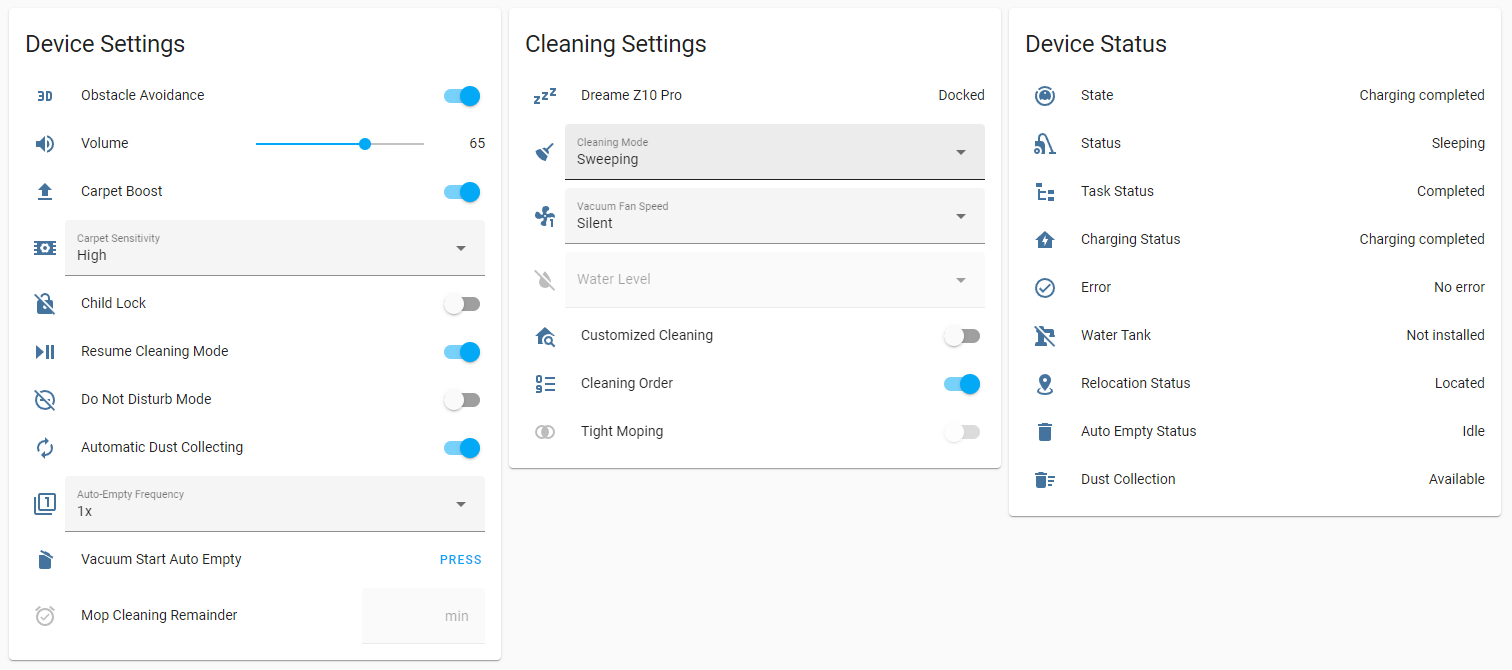
Most entities, including the main vacuum entity, are provided with dynamic icons that reflect their current state. These icons can be overridden in the entity settings if desired. Additionally, most sensor entities and all select entities return their raw integer value under the raw_value, map_id, or segment_id attributes, which simplifies their use in automations and services.
A dynamic refresh rate is applied to all entities, determined by their expected change frequency and the current device state. Home Assistant is only informed of changes when a property update is detected via listeners, functioning similarly to a local push approach.
State Synchronization Delay
It may take some time for an entity to reflect changes made directly in the official application. This delay is expected when using the Local or Xiaomi Home connection methods, as they rely on periodic data polling rather than the instant cloud push notifications utilized by other connection methods.
Certain entities have custom availability rules tied to the state of other entities, mirroring the logic extracted from the official application. For example, the tight_mopping switch becomes unavailable when a water tank or mop pad is not attached. Cloud-connected entities are also exposed for settings stored within specific map data rather than on the device itself, such as map_rotation.
Entity Availability & Firmware Limitations
Some entities may not be available on devices with older firmware versions, such as customized_cleaning and cleaning_mode. Furthermore, some entities are disabled by default, and others can be accessed directly via the vacuum entity's attributes.
All generated entities follow a standard naming schema:
[domain].[vacuum name]_[entity name] (e.g., switch.l10s_gen2_resume_cleaning)
| Name | Description | Notes |
|---|---|---|
resume_cleaning | Enable/Disable resume cleaning feature | Vacuum entity returns its state as paused before cleaning continues while charging |
carpet_boost | Enable/Disable carpet boost feature | |
carpet_recognition | Enable/Disable recognition feature | Available on vacuums with ultrasonic sensor |
obstacle_avoidance | Enable/Disable 3D obstacle avoidance | Available on vacuums with line laser |
customized_cleaning | Enable/Disable customized room cleaning | Available on devices with firmware above 1056 |
child_lock | Enable/Disable child lock | |
tight_mopping | Enable/Disable tight mopping pattern | Available on devices with firmware above 1056 and unavailable when water tank or mop pad is not installed |
dnd | Enable/Disable do not disturb | |
multi_floor_map | Enable/Disable multi-floor map | Available on vacuums that can store more than one map |
auto_dust_collecting | Enable/Disable automatic dust collecting when cleaning completed | Available on vacuums with auto-empty station |
self_clean | Enable/Disable automatic self cleaning feature | Available on vacuums with self-wash base |
self_clean_by_zone | Automatically clean the mop pads after cleaning a specific zone | Available on devices with self clean by zone feature |
auto_drying | Enable/Disable automatic drying of the mop after the cleaning is completed | Available on vacuums with self-wash base |
water_electrolysis | Enable/Disable water electrolysis feature | Available on vacuums with water electrolysis feature |
auto_water_refilling | Enable/Disable external water input for self-wash base | Available on vacuums with self-wash base and external water input |
auto_mount_mop | Enable/Disable automatic assembly and disassembly of mop pads according selected cleaning mode | Available on vacuums with automatic mop assembly feature |
carpet_avoidance | Avoid carpets if mop pads are attached | Available on vacuums with mop pad lifting feature |
auto_add_detergent | Use detergent cartridge for cleaning the mop pads | Available on vacuums with self-wash base and detergent cartridge |
auto_charging | Automatically return to the base station for charging | Available on devices with auto charging feature |
map_saving | Map saving mode setting for VSLAM devices | Available on vacuums without lidar navigation |
ai_obstacle_detection | Enable/Disable AI obstacle detection | Available on S10 and L10s models |
ai_obstacle_image_upload | Enable/Disable uploading obstacle picture to cloud | Available on devices with front camera |
ai_obstacle_picture | Enable/Disable obstacle picture displaying | Available on devices with front camera |
ai_pet_detection | Enable/Disable AI pet detection | Available on devices with front camera |
ai_human_detection | Enable/Disable AI human detection | Available on S10 and S10 Pro |
ai_furniture_detection | Enable/Disable AI furniture detection | Available on devices with front camera |
ai_fluid_detection | Enable/Disable AI fluid detection | Available on devices with front camera |
fill_light | After turned on, it will automatically fill light in a poorly lit environment to improve the obstacle avoidance ability and the screen clarity in the video | Available on devices with front camera and front light |
collision_avoidance | After it is turned on, collisions with walls, furniture and obstacles are reduced, and the cleaning efficiency and coverage are slightly reduced | Available on devices with this feature |
stain_avoidance | After it is turned on and when a stain is identified, the area is avoided and not cleaned | Available on devices with AI fluid detection feature |
intelligent_recognition | Enable/Disable automatic map switching when multi-floor map is enabled | Available on devices with WiFi map feature |
cleaning_sequence | Enable/Disable custom room cleaning sequence | Available with map feature (This is a dynamically created entity and not actually tied to any setting directly. When turned off, the current cleaning order is deleted and regenerated with the default order, or the previous order is restored from memory when turned on again) |
voice_assistant | Enable/Disable the built-in voice assistant on the vacuum | Available on devices with voice assistant feature |
fuzzy_obstacle_detection | Allow the vacuum to detect and avoid fuzzy or less distinct obstacles | Available on devices with AI fuzzy obstacle detection |
ai_pet_avoidance | Use AI camera to identify and actively avoid pets while cleaning | Available on devices with pet detective feature |
pet_picture | Automatically capture pictures of pets encountered during cleaning | Available on devices with pet detective feature |
pet_focused_detection | Prioritize detection of pets and pet-related objects | Available on devices with pet furniture feature |
floor_direction_cleaning | Clean along the direction of the floorboards to prevent scratching | Available on devices with floor direction cleaning feature |
pet_focused_cleaning | Adapt cleaning strategy when pets are detected | Available on devices with pet detective feature |
smart_charging | Calculate the exact amount of battery needed to finish the cleaning job and resume | Available on devices with auto charging feature |
human_follow | Allow the vacuum to follow a person using its camera | Available on devices with mop pad swing and camera streaming features |
max_suction_power | Enable the absolute maximum suction power mode for intensive cleaning | Available on devices with max suction power feature |
smart_drying | Automatically adjust drying time based on environmental humidity | Available on devices with smart drying feature |
hot_washing | Use hot water to wash the mop pads at the base station | Available on devices with hot washing but without smart mop washing feature |
uv_sterilization | Enable UV light sterilization for the mop or water tank | Available on devices with UV sterilization feature |
camera_light_brightness_auto | Automatically adjust the brightness of the built-in camera fill light | Available on devices with camera streaming and fill light features |
off_peak_charging | Schedule the vacuum to charge only during off-peak electricity hours | Available on devices with off-peak charging feature |
mopping_under_furnitures | Extend the mop pad to clean thoroughly underneath low furniture | Available on devices with mop pad swing plus feature |
gap_cleaning_extension | Extend the mop pad into tight gaps and edges | Available on devices with mop pad swing plus feature |
intensive_carpet_cleaning | Increase suction and adjust cleaning pattern specifically for carpets | Available on devices with intensive carpet cleaning feature |
large_particles_boost | Temporarily boost suction power when large debris is detected | Available on devices with large particles boost feature |
ultra_clean_mode | Perform a highly intensive cleaning pass over the entire area | Available on devices with ultra clean mode but without smart mop washing feature |
streaming_voice_prompt | Enable voice prompts while the camera stream is active | Available on devices with camera streaming feature |
clean_carpets_first | Prioritize cleaning carpeted areas before moving to hard floors | Available on devices with clean carpets first feature |
silent_drying | Reduce noise during the mop pad drying process | Available on devices with silent drying feature |
hair_compression | Automatically compress collected hair in the dustbin to save space | Available on devices with hair compression feature |
side_brush_carpet_rotate | Adjust side brush rotation behavior when transitioning onto carpets | Available on devices with side brush carpet rotate feature |
side_reach | Extend the side brush for better edge sweeping | Available on devices with side reach feature |
smart_mop_washing | Dynamically adjust mop washing duration based on how dirty the mop is | Available on devices with smart mop washing feature |
dnd_disable_resume_cleaning | Prevent the vacuum from resuming a paused cleaning task during Do Not Disturb hours | Available on devices with DND functions |
dnd_disable_auto_empty | Prevent the base station from auto-emptying the dustbin during Do Not Disturb hours | Available on devices with DND functions |
dnd_reduce_volume | Lower the vacuum's voice prompt volume during Do Not Disturb hours | Available on devices with DND functions |
auto_change_mop | Automatically eject and attach different mop pads based on cleaning requirements | Available on devices with automatic mop changing feature |
lift_chassis_on_carpet | Lift the vacuum's main chassis to better navigate high-pile carpets | Available on devices with chassis lifting on carpet feature |
close_roller_cover_on_carpet | Close the main roller brush cover to prevent it from getting stuck on carpets | Available on devices with roller cover feature |
dust_bag_drying | Use hot air to dry the dust bag inside the base station | Available on devices with manual dust bag drying feature |
ring_light_always_on | Keep the vacuum's indicator ring light turned on constantly | Available on devices with ring light always on feature |
active_suspension_crossing | Use active suspension to lift the vacuum over tall thresholds or obstacles | Available on devices with active suspension feature |
dynamic_obstacle_cleaning | Dynamically adjust the cleaning path around newly detected obstacles | Available on devices with dynamic obstacle cleaning feature |
pressurized_cleaning | Apply downward pressure on the mop pads for better stain removal | Available on devices with pressurized cleaning feature |
lds_state | Toggle the lifting state of the LDS (Laser Distance Sensor) module | Available on devices with auto LDS lifting feature |
mop_washing_with_detergent | Automatically mix detergent into the water when washing the mop pads | Available on devices with auto add detergent and mopping with detergent features |
mop_extend | Extend the mop pads for better edge coverage | Available on devices with mop extend feature |
mopping_with_detergent | Automatically add detergent to the water tank for mopping | Available on devices with mopping with detergent feature |
obstacle_crossing | Coordinate wheels and suspension for climbing difficult obstacles | Available on devices with obstacle crossing feature |
| Name | Description | Notes |
|---|---|---|
cleaning_time | Cleaning duration of last/current cleaning job | Unavailable during fast mapping |
mapping_time | Mapping duration of current fast mapping job | Only available when robot is fast mapping |
cleaned_area | Cleaned area of last/current cleaning job | Unavailable during fast mapping |
state | State of the robot | This entity exposes robot states that are not present in Home Assistant natively, such as charging_completed |
status | Status of the robot | |
relocation_status | Relocation status of the robot | |
task_status | Task status of the robot | |
water_tank | Water tank status of the robot | Available on vacuums with water tank |
mop_pad | Water mop pad status of the robot | Available on vacuums with self-wash base |
dust_collection | Dust collection availability status | Available on vacuums with auto-empty station |
auto_empty_status | Status of auto empty dock | Available on vacuums with auto-empty station |
self_wash_base_status | Status of self-wash base | Available on vacuums with self-wash base |
error | Fault code description of robot | Error reporting |
charging_status | Charging status of the robot | |
battery_level | Battery level of the robot | |
first_cleaning_date | First cleaning date | |
total_cleaning_time | Total cleaning duration | |
cleaning_count | Total cleaning times | |
total_cleaned_area | Total cleaned area | |
stream_status | Current status of the live camera video stream (e.g., Idle, Streaming) | Available on devices with camera streaming feature |
drainage_status | Current status of the base station's water drainage system | Available on devices with water check feature |
low_water_warning | Indicates if the clean water tank in the base station is running low | Available on devices with self-wash base |
task_type | The type of task currently being executed (e.g., Cleaning, Returning, Washing) | Available on devices with task type feature |
firmware_version | The current firmware version installed on the vacuum | |
cleaning_progress | The completion percentage of the current cleaning job | Available on devices with cleaning progress feature |
drying_progress | The completion percentage of the current mop drying cycle | Available on devices with self-wash base |
dust_bag_drying_status | Current state of the dust bag drying process (e.g., Drying, Idle) | Available on devices with manual or auto dust bag drying feature |
clean_water_tank_status | Current status and level of the clean water tank in the base station | Available on devices with self-wash base |
dirty_water_tank_status | Current status and level of the dirty water tank in the base station | Available on devices with self-wash base |
dust_bag_status | Current status of the dust collection bag (e.g., Present, Full, Missing) | Available on devices with auto-empty station |
detergent_status | Current status of the detergent cartridge in the base station | Available on devices with self-wash base |
hot_water_status | Current temperature or status of the hot water heater for mop washing | Available on devices with hot washing feature |
station_drainage_status | Current status of the automatic water hookup drainage system | Available on devices with drainage feature |
Consumable sensor entities are dynamically generated to report the remaining life or time left for various device parts and accessories.
Map sensor entities are dynamically generated from saved maps to report map-related states.
| Name | Description | Notes |
|---|---|---|
charging_state | Indicates whether the vacuum is currently charging on the base station | |
roller_cover_status | Indicates if the main roller brush cover is properly installed or closed | Available on devices with roller cover feature |
lds_status | Indicates if the LDS (Laser Distance Sensor) module is in its lifted position | Available on devices with auto LDS lifting feature |
| Name | Description | Notes |
|---|---|---|
volume | Volume level | |
mop_cleaning_remainder | Mop cleaning remainder | |
camera_light_brightness | Target brightness level of the camera's fill light | Available on devices with camera streaming and fill light features |
self_clean_area | The designated area size (in square meters) to clean before returning to wash the mop | Available on devices with self wash base but without mop clean frequency feature |
self_clean_time | The designated time (in minutes) to clean before returning to wash the mop | Available on devices with self clean frequency but without mop clean frequency feature |
wetness_level | The target moisture level for the mop pads during mopping | Available on devices with wetness level feature |
drying_time | The designated duration (in hours) for drying the mop pads | Available on devices with self wash base and mop clean frequency or long drying time feature |
auto_empty_area | The designated area size to clean before returning to empty the dustbin | Available on devices with auto empty area and mode features |
| Name | Description | Notes |
|---|---|---|
dnd_start | Do not disturb start | Unavailable when do not disturb is disabled |
dnd_end | Do not disturb end | Unavailable when do not disturb is disabled |
off_peak_charging_start | The starting time for off-peak electricity charging | Available on devices with off-peak charging feature |
off_peak_charging_end | The ending time for off-peak electricity charging | Available on devices with off-peak charging feature |
| Name | Description | Notes |
|---|---|---|
start_auto_empty | Start auto-emptying | Available on vacuums with auto-empty station |
clear_warning | Clear warning | Unavailable when there is no warning to clear |
self_clean | Manually start/pause mop washing | Available on vacuums with self-wash base, unavailable when washing is not possible |
manual_drying | Manually start/stop mop drying | Available on vacuums with self-wash base, unavailable when drying is not possible |
manual_dust_bag_drying | Trigger or stop the dust bag drying process manually | Available on devices with manual or auto dust bag drying feature |
water_tank_draining | Trigger the base station to drain its internal water lines | Available on devices with drainage feature |
base_station_self_repair | Trigger the base station's self-diagnosis and repair routine | Available on devices with self-wash base |
start_recleaning | Command the vacuum to restart the previous cleaning job from the beginning | Available on devices with auto re-cleaning and map features |
empty_water_tank | Command the vacuum to completely empty its onboard water tank | Available on devices with water tank draining feature |
base_station_cleaning | Trigger the base station's self-cleaning routine for its washboard | Available on devices with station cleaning feature |
reload_shortcuts | Reload the saved cleaning shortcuts from the vacuum | Available on devices with shortcuts feature |
shortcut_{1-33} | Execute a specific saved cleaning shortcut | Available on devices with shortcuts feature |
Consumable button entities are used to reset the remaining life of device parts and accessories after replacement or cleaning.
Map button entities are used to trigger mapping functions or interact with saved maps.
| Name | Description | Notes |
|---|---|---|
suction_level | Suction level of the vacuum | Unavailable if customized cleaning is enabled and the current job is not zone cleaning or spot cleaning |
water_volume | Water volume of the vacuum | Available on vacuums with water tank. Unavailable if customized cleaning is enabled and the current job is not zone cleaning or spot cleaning |
mop_pad_humidity | Humidity level of the mop pad | Available on vacuums with self-wash base. Unavailable if customized cleaning is enabled and the current job is not zone cleaning or spot cleaning |
cleaning_mode | Cleaning mode of the vacuum (Sweeping, Mopping, Sweeping and mopping) | Unavailable during cleaning. (Options are dynamically generated for vacuums without a liftable mop pad) |
carpet_sensitivity | Carpet sensitivity of carpet boost feature | Unavailable when carpet boost is disabled |
auto_empty_frequency | Auto empty frequency | Unavailable when automatic dust collection is disabled or not available |
self_clean_area | Select cleaning area before return to clean the mop pad | Available on vacuums with self-wash base |
mop_wash_level | Mop cleaning water usage level | Available on vacuums with self-wash base and external water input |
drying_time | Mop drying time in minutes | Available on vacuums with self-wash base |
mopping_type | Mopping type for deep or daily cleaning | Available on vacuums with AI fluid and stain detection feature |
wider_corner_coverage | Frequency of reversing into corners to clean them with the mop pad | Available on devices without mop pad swing and mop clean frequency features |
mop_pad_swing | Frequency of swinging the rear of the vacuum to clean edges with the mop pad | Available on devices with mop pad swing but without mop extend feature |
voice_assistant_language | The language spoken by the vacuum's built-in voice assistant | Available on devices with voice assistant feature |
auto_empty_mode | The logic used to determine when the vacuum should auto-empty its dustbin | Available on devices with auto empty mode feature |
cleangenius | Enable automatic intelligence for room cleaning and mopping settings | Available on devices with CleanGenius feature |
auto_rewashing | Logic for deciding if the mop pad needs a second wash based on dirtiness | Available on devices with auto rewashing feature |
auto_recleaning | Logic for deciding if heavily soiled areas need a second cleaning pass | Available on devices with auto recleaning feature |
cleaning_route | The navigation pattern used during cleaning (e.g., Standard, Deep, Fast) | Available on devices with cleaning route feature |
custom_mopping_route | The navigation pattern specifically used when mopping is enabled | Available on devices with custom mopping route feature |
self_clean_frequency | The condition (Area, Time, or Room) that triggers a return for mop washing | Available on devices with self clean frequency feature |
mop_clean_frequency | The specific frequency value based on the chosen self-clean frequency mode | Available on devices with self-wash base and mop clean frequency features |
mop_extend_frequency | The specific frequency value based on the chosen mop extend mode | Available on devices with mop extend feature |
cleangenius_mode | The intensity level of the CleanGenius automated cleaning mode | Available on devices with CleanGenius mode feature |
washing_mode | The intensity of the mop washing cycle at the base station | Available on devices with smart mop washing feature |
water_temperature | The target temperature of the water used for washing mop pads | Available on devices with water temperature feature |
mop_pressure | The amount of downward pressure applied to the mop pads | Available on devices with mop pressure feature |
mop_temperature | The target temperature of the mop pads during cleaning | Available on devices with mop temperature feature |
low_lying_area_frequency | The frequency of cleaning specifically under low-lying furniture | Available on devices with low lying area frequency feature |
scraper_frequency | The frequency of using the scraper tool (if applicable) | Available on devices with scraper frequency feature |
battery_charge_level | The target battery percentage to charge to before resuming a cleaning job | |
auto_lds_coverage | The coverage setting for lifting the LDS sensor in tight spaces | Available on devices with auto LDS lifting feature |
Room select entities are dynamically generated from saved maps and are used to edit customized cleaning settings per room.
Map select entities are used to interact with saved maps.
Camera entities are only available when using a cloud connection and are used to render live maps and saved maps.