
English
Appearance
The Valetudo Map Card is a specialized map rendering card originally designed for Valetudo, but fully compatible with this integration via a reverse-engineered map data generation process with optimization features.

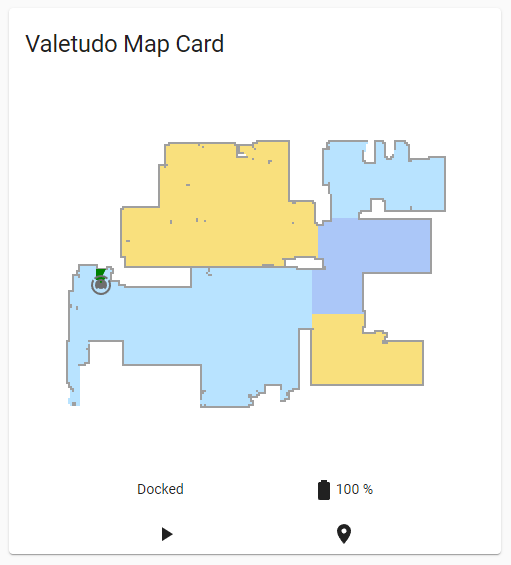
Instead of displaying a pre-rendered image, this card utilizes a dedicated data entity to fetch raw map coordinates and renders the map directly in the browser. This offloads the rendering process from the Home Assistant server to the frontend, resulting in zero backend resource consumption. For installations running on low-resource hardware (limited CPU or RAM), all other image-based camera entities can be disabled to completely shut down backend rendering, while still retaining full map visibility through this card.
The Valetudo Map Card relies on the Map Data (camera.map_data) entity, which is disabled by default in the integration. Before configuring the card, this entity must be manually enabled.
To enable the map data entity:
camera.map_data) entity.type: custom:valetudo-map-card
vacuum: # Your vacuum name not the entity id
rotate: 0 # Map rotation entity does not work on valetudo map card
dock_icon: mdi:lightning-bolt-circle
dock_color: rgb(105 178 141)
vacuum_color: rgb(110, 110, 110)
wall_color: rgb(159, 159, 159)
floor_color: rgb(221, 221, 221)
no_go_area_color: rgb(177, 0, 0)
no_mop_area_color: rgb(170, 47, 255)
virtual_wall_color: rgb(199, 0, 0)
virtual_wall_width: 1.5
currently_cleaned_zone_color: rgb(221, 221, 221)
path_color: rgb(255, 255, 255)
path_width: 1.5
segment_opacity: 1
segment_colors:
- rgb(171, 199, 248)
- rgb(249, 224, 125)
- rgb(184, 227, 255)
- rgb(184, 217, 141)Card Limitations
Because the map image rendering happens on the browser, the Valetudo Map Card uses its own color index algorithm. It does not render room icons or names, and it ignores the map rotation setting from the integration's map data. However, it generates map images much more quickly.